Thursday, June 14, 2012

Museum Box as an educational tool

Museum Box as an educational tool:
  1. Name of the Tool: Museum Box
  2. URL of the Tool: http://museumbox.e2bn.org/


  1. Please select the one, primary category for this tool:  Learning Organization Tool
  2. Please describe this tool in your own words in about 250 words.
Museum Box is a web based tool that allows the students to chose a topic and host information about that topic in different boxes. Each box will have a label (subject) and inside the box there are cubes.
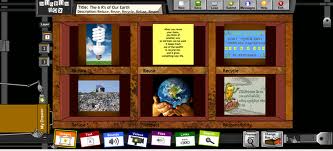

On each of the six sides of the cube information about the box title can be saved. This could be text, audio file, video clip, internet link,…etc. The students will be creating different cube projects to be shared with others. When the cube project is finished and submitted it has to approved by the school administrator then published on the web. When you click on the box you could chose to read, hear or watch any of these files to know about this box project. You could do the same thing with each box in the museum box.


  1. Try using the Tool (you may need to sign up for a free or trial account) so that you will learn how it works and what its capabilities are - and so that you will be able to answer the following questions.

The account has to be a school’s account. I tried to sign up twice but it did not work and I got a nessage there was a temporary technical problem.

  1. What do you need to know before using this tool? (What skills do you need to have?)

Basic computer and internet skills. No special skills needed.

  1. What do you need to have before using this tool? (Resources)

Computer or mobile device with internet access is the only thing needed for teachers and students.

        8. How do you use this tool? (Write the basic steps using a numbered list)

1-   The teacher should sign up with the school’s name.

2-   The students login and chose a title for the box

3-   The students click on cubes and chose each of the six sides of cube to add, text, links, audio or video files using the corresponding tabs at the bottom of the screen.

4-   The students submit project.

5-   The administrator will either approve and publish project or return it to students with comments for modification and editing.


      9. If applicable, please create an example with this tool and either embed in your blog or submit the URL.

I tried to sign up but the website seem to have changed its login system or is having technical difficulties.


10.  Please describe a scenario of how you might use this tool in a teaching environment.

This tool is ideal for K12 teaching environment. The teacher may ask the students to prepare projects. They may work individually or even better in teams.  A topic for a project can be assigned by teacher (e.g. Ancient Egypt). The students will enter the title, chose the boxes and number of layers, give a name to each cube ( e.g. Agriculture,  Religion, politics, …) The students will start working on the project completing the six sides of the each cube. They can then submit this. The teacher can publish it or return it to students with comments to be modified or edited. Once complete, submitted and published it can be shared with others. The project designing and collaborative learning are two important aspects of Box Museum that should enhance the students’ learning.

11. What are the advantages of using this tool in a teaching environment?

-          Cost efficiency

-          Lack of equipment needed
-     Simple concept and easy to use (if it works properly)

12.  What are the disadvantages of using this tool in a teaching environment?

     -       Lack of assessment by the tool.

     -      Technical difficulties (also mentioned by others on some reviews)

    -       Geared mainly toward K12 (school account, cubes, boxes, …)

Sunday, June 10, 2012

Edmodo: Communication and collaboration Tool


Edmodo as an educational tool:

  1. Name of the Tool: Edmodo
  2. URL of the Tool: www.edmodo.com
  3. Please select the one, primary category for this tool:  Communication  and collaboration Tool
  4. Please describe this tool in your own words in about 250 words.

Edmodo is a web based educational program that allows teachers and students to participate in microblogging discussions like Twitter, respond to polls, and manage and submit assignments.  It creates a social networking environment like Facebook. To access Edmodo, students must enter a personal “access code,” given to them by their teacher. Only teachers can create and manage Edmodo accounts. As shown in snapshot below, Edmodo has an interface that is similar to Facebook, which eases the difficulty level for most students because they likely are already familiar with Facebook and other social networking websites from their personal use.


Edmodo is a free program available at www.edmodo.com. There are no licensing requirements to date. Teachers and students do not need to download anything, but rather simply register and create an account within the website.

Edmodo is applicable for a large range of curriculae and educational uses. It allows students to use the content that they are learning and discussing via Edmodo to make connections to other curriculums and situations beyond the classroom through discussions. Students can read and understand the content-related literature and then draw inferences and conclusions that can be developed through teacher guidance and questioning on the Note feature of Edmodo. Teacher facilitating and student modeling will allow students to develop the higher level thinking skills. Students will work in a collaborative environment with other students


  1. Try using the Tool (you may need to sign up for a free or trial account) so that you will learn how it works and what its capabilities are - and so that you will be able to answer the following questions.


  1. What do you need to know before using this tool? (What skills do you need to have?)

Basic computer and internet skills. No special skills needed.


  1. What do you need to have before using this tool? (Resources)

Computer or mobile device with internet access is the only thing needed for teachers. Students needs to get their access code from their teachers.

     8. How do you use this tool? (Write the basic steps using a numbered list)


2- The teacher should now choose an avatar for him or herself, establish the privacy settings, and set up the notifications, or alerts, to determine how and when you want to know about student activity.


3- Give the students the access code for their particular group so that they can join. Have them enter their personal information and create a password.

4- Teachers can now begin posting messages, assignments, and polls for students to respond to or complete.


The following link has nice editorial audio slide show:

      9. If applicable, please create an example with this tool and either embed in your blog or submit the URL.
I created the following quizz: http://www.edmodo.com/home?quiz_id=286791


10.  Please describe a scenario of how you might use this tool in a teaching environment (about 500 words).
I would like to have two fellowship programs in two different institutions have a board review with identical assignments and resources. I would establish an Edmodo account and enter the groups into the system. I will then set up the notifications, or alerts, to determine how and when I want to know about student activity. I will give the students the access code for their particular group so that they can join. And have them enter their personal information and create a passwords. I will then begin posting messages, assignments, and polls for students to respond to or complete. I will follow the students’ micro blogs and discussions students and assess them based on the quality and/or quantity of their posts and responses through Edmodo. I will create multiple choice questions to assess the general class knowledge with planned immediate feedback. I will also give them quizzes and polls and grade them at the end of the course.

11. What are the advantages of using this tool in a teaching environment?
-          Cost efficiency
-          Lack of equipment needed
-          Familiarity to students (similar to Face book and Twitter)
-          Assessment options ( grade book , polls)
-          Mobile capability

12.  What are the disadvantages of using this tool in a teaching environment?
 Edmodo is an open forum where students can express their answers and opinions and some students may discuss inappropriate or off-topic issues. Teacher cautioning and monitoring is required.